







A seller reached out to us three months after launching their product. When we looked at their campaign history, the pattern was all too common: $3,200 gone in five weeks, ACoS at 165%, campaigns paused by week six. The product was solid, 4.6 stars, better than half the competition. None of it mattered because they’d treated advertising like a light switch instead of a strategy.
They’re doing fine now. But it cost them three additional months and a complete rebuild.
Here’s what most sellers miss – The first 90 days after launch are when Amazon’s algorithm is actively studying your product. It’s gathering signals, testing relevance, and deciding which searches you belong in. Your window to influence those decisions is short. Get it right, and you rank. Get it wrong, and you spend months undoing bad signals.
Most sellers fail because they make three critical errors:
They chase keywords they can’t win.
They confuse activity with strategy.
They quit when it matters most.
This guide shows you how to avoid that. You’ll learn how to structure your first 90 days, target keywords you can actually rank for, and read the signals that tell you whether it’s working. Whether you’re about to launch your first product or you’re trying to fix a launch that’s already struggling, this is your roadmap to getting it right.
How Does Amazon Decide Which Products Rank?
Before you spend a single dollar on ads, you need to understand how Amazon decides which products deserve to rank at the top of search results.
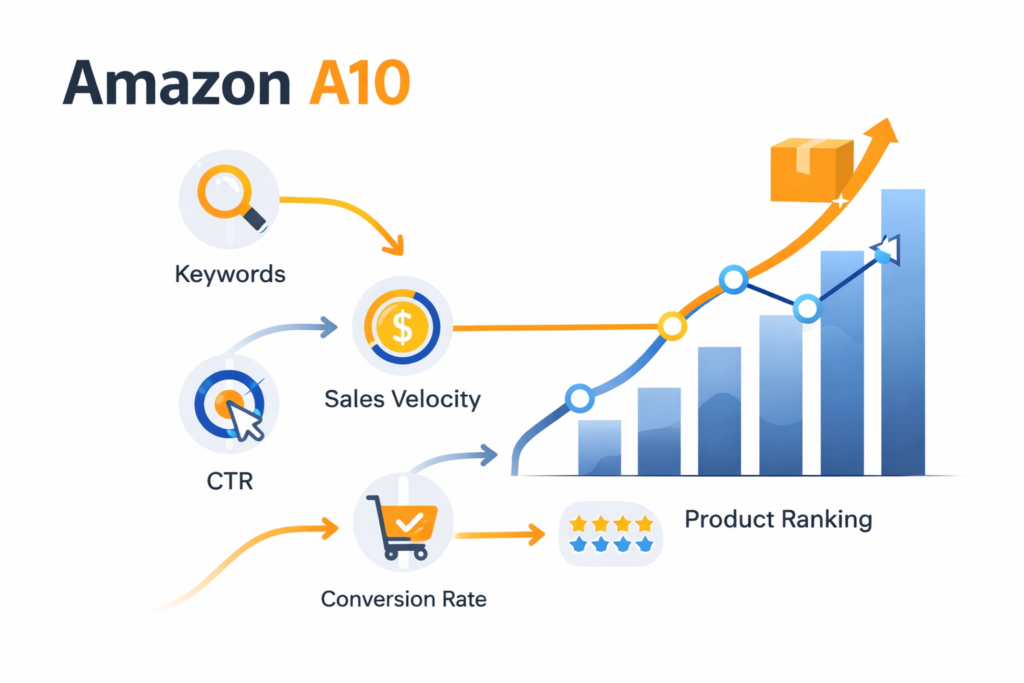
Amazon uses a sophisticated algorithm (often called the A10 algorithm) that evaluates hundreds of factors. But at its core, the system is looking for one thing: which products are most likely to make Amazon money.
Think of it like this: Amazon is running a massive shopping mall, and it wants to put the best-performing stores in the most visible locations. Your job is to prove that your product deserves that visibility.
Here’s how the algorithm evaluates your product:
The Core Ranking Signals
Click-Through Rate (CTR): CTR measures how often shoppers click your listing when they see it in search results. Strong CTR signals that your main image, title, and price are relevant to the query. Weak CTR kills launches before they start—Amazon stops showing listings that shoppers consistently ignore.
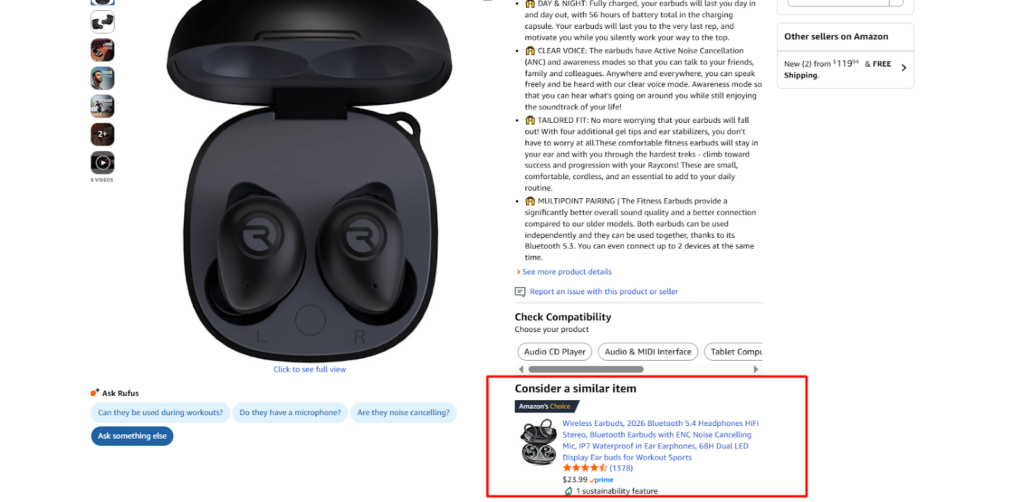
Your main image is your first and most important ad. If it doesn’t stop the scroll on mobile, no targeting strategy will save you.
- Customer Satisfaction Signals: Reviews, ratings, return rates, and customer questions all feed into Amazon’s assessment of product quality. Even great ad performance won’t overcome consistently poor reviews.
Thinking About Hiring an Amazon Expert?
Ecomclips’ Partners Achieve an Average 85% Profit Increase!
Let’s Talk
How Ads Drive Organic Ranking
Here’s the biggest misconception new sellers have: ads do not directly rank your product.
Let me repeat that: running Amazon PPC ads does not, by itself, improve your organic ranking position.
So why do we use ads to rank? Because ads do something more powerful — they drive sales, and sales drive ranking.
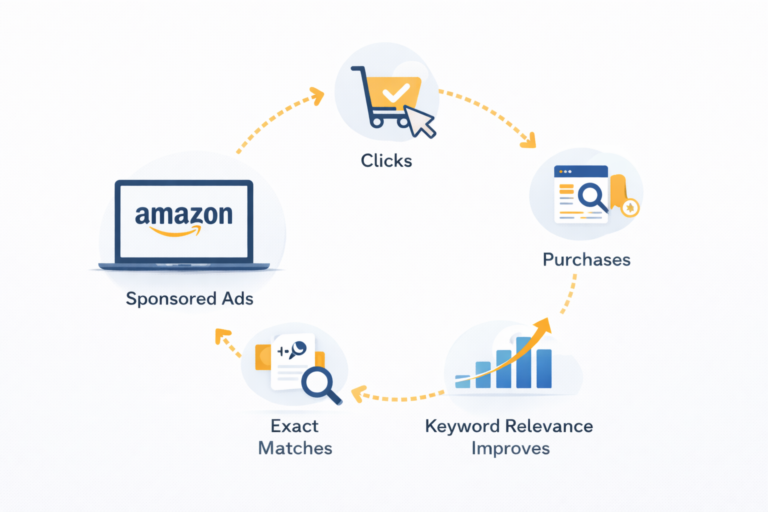
The loop works like this: Your ad shows for “wireless running earbuds” → Customer clicks and buys → Amazon registers that sale for that specific keyword → Your keyword relevance strengthens → Your organic ranking improves → You start getting organic sales → Those organic sales further boost ranking.
The key takeaway: Ads are the ignition. Sales are the fuel. Ranking is the result.
Why the First 90 Days Matter for Ranking
Why Amazon’s First 90 Days Can Make or Break Your Product
When you launch a new product on Amazon, you enter what’s called a “learning phase”. During this critical window, Amazon is actively collecting data about your product to determine where it belongs in the marketplace.
Think of it like a probationary period at a new job. Your employer is watching closely to see how you perform, and your actions during those first few months will shape their long-term perception of you.
Here’s what Amazon is learning during your first 90 days:
Performance Metrics: Amazon tracks how shoppers interact with your listing: Are they clicking? Are they buying? Are they staying on the page or bouncing immediately? Every interaction teaches Amazon whether your product is worth promoting.
Keyword Relevance: Amazon is testing which search terms your product performs well for. When someone searches for “wireless earbuds” and buys your product, Amazon learns that your product is relevant for that keyword.
Market Positioning: Amazon is figuring out where your product fits in its catalog. Are you a premium option? A budget alternative? A direct competitor to established brands? Your early sales data helps Amazon categorize you.
What Happens If You Don’t Advertise Early: Many new sellers make the mistake of “waiting to see how it goes” before investing in ads. This is one of the costliest mistakes you can make.
Without ads in the first 90 days:
Your product remains invisible
You collect no performance data
Competitors take your keywords
You lose momentum forever
What Campaign Structure Actually Works for New Product Launch on Amazon?
Most sellers either launch random campaigns hoping something works, or they copy someone else’s structure without understanding why it exists. Both approaches waste money.
The most effective launch structure uses three layers working together: discovery campaigns that find what works, intent capture campaigns that scale winners, and brand presence campaigns that build visibility beyond search.
Discovery Layer: Finding What Converts
Discovery campaigns identify which keywords and competitor products drive conversions before you have enough data to target precisely.
- Auto Campaigns: Sponsored Products Auto campaigns test four targeting types simultaneously: close match, loose match, complements, and substitutes. Within two weeks, you’ll have data on dozens of search terms you never would have thought to target manually.
Auto campaigns get a bad reputation because sellers treat them as set-and-forget. Used correctly as a research tool with weekly search term harvesting, they’re one of your most powerful assets. Start with one Auto campaign at moderate-to-aggressive bids ($0.75-$1.50 depending on category). Set a daily budget of $20-30. Let it run for at least two weeks before judging performance.
- Broad Match Manual Campaigns: Create one Broad Match campaign with 5-12 tightly relevant seed keywords—not 30 or 50. A focused list of terms that directly describe your product generates cleaner data than a sprawling list where you can’t tell what’s actually working. For wireless running earbuds, your broad campaign might target:
wireless earbuds
running headphones
workout earbuds
sport Bluetooth earphones
wireless running headphones
Bid slightly lower than your Auto campaign ($0.60-$1.25). This campaign serves two purposes: ensuring you appear for core terms, and generating additional search term data from a different angle.
Product Targeting Campaigns
Launch a product targeting campaign aimed at 10-20 competitor ASINs at similar price points with similar review counts. This tests whether shoppers actively comparing alternatives will choose your product.
Don’t target products with 5,000 reviews when you have 12. Target products you can realistically compete against. Look for competitors with 3-4 star ratings—their customers might be ready to switch.
Intent Capture Layer: Scaling What Works
After two to three weeks, patterns emerge. Some search terms convert. Most don’t. The winners graduate to Exact Match campaigns where you have maximum control.
- Exact Match Campaigns: Exact Match campaigns are built from search terms that have already proven they convert. This is where most sellers make critical mistakes.
Mistake #1: They leave converting terms in Auto and Broad, competing against themselves and paying more than necessary.
Mistake #2: They move terms to Exact but don’t add them as negatives in discovery campaigns, so they’re still bidding on them in multiple places.
The correct process: When a search term proves it converts (typically 2-3 conversions minimum), move it to Exact Match and immediately add it as a negative exact match in your Auto and Broad campaigns. High-intent traffic should flow to the campaign where you control bids most precisely.
Start aggressive with bids here—20-30% higher than your broad match bids. These keywords have proven ROI. It’s worth paying more to dominate that traffic.
- Phrase Match Campaigns: Phrase Match sits between Broad and Exact. Use it for keywords that show promise but need more data. Terms with 1-2 conversions or strong engagement metrics (high CTR, decent session duration) go here for further testing.
Phrase gives you more control than Broad while still allowing some discovery. If a term performs well in Phrase, it graduates to Exact.
Brand Presence Layer: Building Visibility Beyond Search
- Sponsored Brands: Sponsored Brands campaigns put your logo at the top of search results and can drive traffic to your Storefront. This builds brand recognition even when shoppers don’t click immediately.
During launch, if the budget is tight, prioritize Sponsored Products for the first 30 days. But if you have room, Sponsored Brands from day one compounds brand awareness over time.
What Campaign Structure Actually Works for New Product Launch on Amazon?
Most sellers either launch random campaigns hoping something works, or they copy someone else’s structure without understanding why it exists. Both approaches waste money.
The most effective launch structure uses three layers working together: discovery campaigns that find what works, intent capture campaigns that scale winners, and brand presence campaigns that build visibility beyond search.
Discovery Layer: Finding What Converts
Discovery campaigns identify which keywords and competitor products drive conversions before you have enough data to target precisely.
1. Auto Campaigns: Sponsored Products Auto campaigns test four targeting types simultaneously: close match, loose match, complements, and substitutes. Within two weeks, you’ll have data on dozens of search terms you never would have thought to target manually.
Auto campaigns get a bad reputation because sellers treat them as set-and-forget. Used correctly as a research tool with weekly search term harvesting, they’re one of your most powerful assets. Start with one Auto campaign at moderate-to-aggressive bids ($0.75-$1.50 depending on category). Set a daily budget of $20-30. Let it run for at least two weeks before judging performance.
2. Broad Match Manual Campaigns: Create one Broad Match campaign with 5-12 tightly relevant seed keywords—not 30 or 50. A focused list of terms that directly describe your product generates cleaner data than a sprawling list where you can’t tell what’s actually working. For wireless running earbuds, your broad campaign might target:
- wireless earbuds
- running headphones
- workout earbuds
- sport Bluetooth earphones
- wireless running headphones
Bid slightly lower than your Auto campaign ($0.60-$1.25). This campaign serves two purposes: ensuring you appear for core terms, and generating additional search term data from a different angle.
Product Targeting Campaigns
Launch a product targeting campaign aimed at 10-20 competitor ASINs at similar price points with similar review counts. This tests whether shoppers actively comparing alternatives will choose your product.
Don’t target products with 5,000 reviews when you have 12. Target products you can realistically compete against. Look for competitors with 3-4 star ratings—their customers might be ready to switch.
Intent Capture Layer: Scaling What Works
After two to three weeks, patterns emerge. Some search terms convert. Most don’t. The winners graduate to Exact Match campaigns where you have maximum control.
1. Exact Match Campaigns: Exact Match campaigns are built from search terms that have already proven they convert. This is where most sellers make critical mistakes.
Mistake #1: They leave converting terms in Auto and Broad, competing against themselves and paying more than necessary.
Mistake #2: They move terms to Exact but don’t add them as negatives in discovery campaigns, so they’re still bidding on them in multiple places.
The correct process: When a search term proves it converts (typically 2-3 conversions minimum), move it to Exact Match and immediately add it as a negative exact match in your Auto and Broad campaigns. High-intent traffic should flow to the campaign where you control bids most precisely.
Start aggressive with bids here—20-30% higher than your broad match bids. These keywords have proven ROI. It’s worth paying more to dominate that traffic.
2. Phrase Match Campaigns: Phrase Match sits between Broad and Exact. Use it for keywords that show promise but need more data. Terms with 1-2 conversions or strong engagement metrics (high CTR, decent session duration) go here for further testing.
Phrase gives you more control than Broad while still allowing some discovery. If a term performs well in Phrase, it graduates to Exact.
Brand Presence Layer: Building Visibility Beyond Search
1. Sponsored Brands: Sponsored Brands campaigns put your logo at the top of search results and can drive traffic to your Storefront. This builds brand recognition even when shoppers don’t click immediately.
During launch, if the budget is tight, prioritize Sponsored Products for the first 30 days. But if you have room, Sponsored Brands from day one compounds brand awareness over time.
- Sponsored Display: Sponsored Display targets competitor product detail pages and can retarget shoppers who viewed your listing but didn’t buy. Display ads work differently—they’re less about immediate conversion and more about repeated exposure.
A shopper researching wireless earbuds might view 15 products before buying. If your Display ad appears on three of those pages, you increase the odds they’ll remember and choose you.
- Sponsored Brands Video: Video ads consistently outperform static formats in testing. They capture attention in search results and communicate benefits faster than images alone. Launch video ads by day 60-90 once you have proven keywords and some creative assets.
What Should You Actually Do in the First 30 Days?
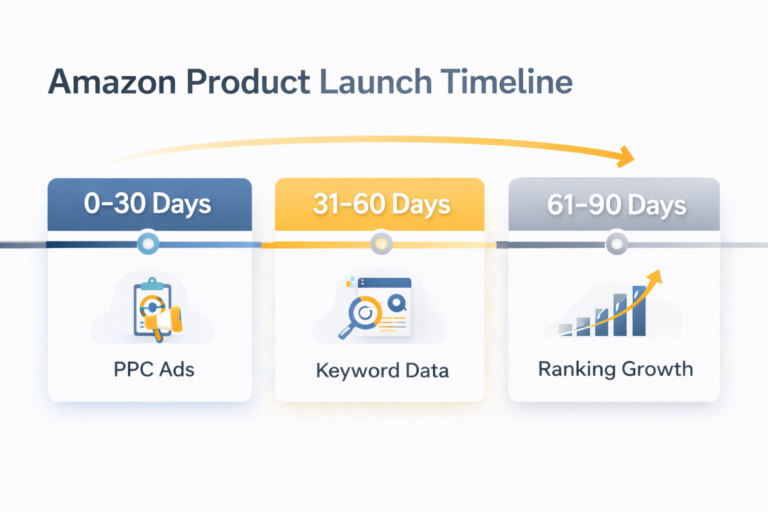
The first 30 days are your data collection phase. You’re paying for information, not profitability. Expect high ACoS. Budget for it. This investment drives every decision for the next 60 days.
- Set Bids Above Amazon’s Suggested Range
Underbidding in month one is the most common and most expensive launch mistake. Amazon gives new products a brief visibility boost. Low bids mean you don’t win enough auctions to capitalize on it. You end up with impressions trickling in over weeks instead of concentrated data that tells you something useful. Bid high early, collect data fast, then optimize based on what you learned.
For most categories, bid 10-20% above Amazon’s suggested bid during week one, then adjust based on performance.
- Pull Your Search Term Report Weekly
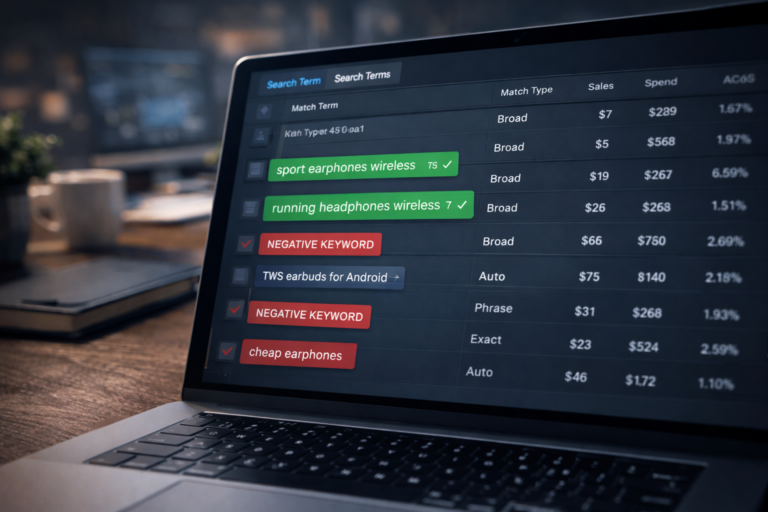
Every week, download your Search Term Report. This shows exactly which queries triggered your ads and whether they converted.
Look for three things:
Terms that converted: Move to Exact Match campaigns, negative them out of discovery campaigns.
Terms that spent $10+ without converting: Add as negative keywords immediately.
Unexpected terms that got clicks: Analyze whether they’re relevant opportunities or wasted spend.
People who check monthly waste weeks of budget on terms that were never going to convert. Weekly reviews during launch are non-negotiable.
- Don’t Panic at High ACoS
A 100% ACoS in week two isn’t failure. It’s the cost of learning which keywords work before you have performance data. A 150% ACoS means you spent $150 to make $100 in revenue—yes, that’s a loss. But if that $150 identified three keywords that will drive sales for months, it was worth it.
The sellers who succeed through launches maintain spending through the learning period. The ones who fail cut bids at the first sign of loss, killing momentum before Amazon learned anything meaningful.
- Optimize Your Listing Before Problems Compound
If you’re getting clicks but no sales (conversion rate below 6%), your listing is the problem, not your ads. Pause optimization and fix the listing immediately:
Test different main images
Rewrite bullets to focus on benefits, not features
Check your price against direct competitors
Add lifestyle images showing the product in use
Review one-star reviews on similar products to address common objections
Amazon advertising can’t fix a listing problem. It can only expose one faster and more expensively.
What Changes Between Days 31-60?
Days 31-60 are your building phase. You’ve learned what works. Now you scale winners and cut losers ruthlessly.
- Shift Budget from Discovery to Exact Match
By day 30, you should have 15-40 search terms with actual conversions. These form your foundation.
Your Exact Match campaigns should be growing while Auto and Broad budgets shrink. If 60% of your spend is still in discovery campaigns at day 45, you haven’t built anything—you’re still guessing.
Target allocation by day 45:
40-50% to Exact Match (proven winners)
25-30% to Phrase Match (testing zone)
20-25% to Auto/Broad (ongoing discovery)
5-10% to Product Targeting (competitive conquesting)
- Test Placement Modifiers on Your Best Keywords
Amazon lets you bid up to 900% more for top-of-search placement. For some keywords, the premium placement is worth it. For others, it’s just more expensive clicks.
A keyword converting at 12% in middle-of-page placement might convert at 14% at top-of-search. But if top-of-search costs twice as much per click, you’re losing money on the placement bid.
Test this on your top 5-10 keywords. Increase top-of-search modifier to 50-100% for two weeks. Compare conversion rates and cost-per-acquisition. Let data decide, not assumptions.
- Expand Product Targeting Based on What’s Working
You’ve now learned which competitor ASINs convert. Double down. Add more products similar to your best performers. Add complementary products and accessories that attract the same shopper profile.
If you’re selling wireless earbuds and getting sales from targeting premium competitor products, that tells you something about your customer. Target more premium products. If your conversions come from budget competitors, adjust your targets accordingly.
- Monitor Your Keyword Ranking Progress
Check your organic ranking weekly for your top 10 keywords. You should see movement by week 4-6. If a keyword hasn’t improved by day 45, investigate:
Is it getting sales? (If no, that’s why it’s not ranking)
Is your conversion rate competitive? (Low CVR prevents ranking)
Is competition too strong? (You might need more time or a different keyword)
Ranking isn’t linear. You might jump from position 250 to 180 to 145 to 87 to 64. The trend matters more than daily fluctuations.
What’s Different in Days 61-90?
Days 61-90 shift from building to optimizing. If you executed months one and two correctly, month three is refinement. Your keyword list is now driven by performance data, not guesses.
Lower Discovery Spend, Maximize Intent Capture
By now, Exact Match should represent 50-60% of your total spend. You’ve identified your winners. Pour budget into proven keywords while maintaining minimal discovery spend to catch new opportunities.
Reduce Auto and Broad bids by 20-30%. You don’t need aggressive discovery anymore—you need to defend and scale what’s already working.
Launch Video Ads If You Haven’t
Sponsored Brands Video ads frequently outperform static ads in both CTR and conversion rate. Video communicates product benefits faster and holds attention longer than images.
You don’t need Hollywood production. A clean 20-second video showing your product in use, highlighting 2-3 key benefits, will outperform static ads for many products.
Watch TACoS for Organic Momentum
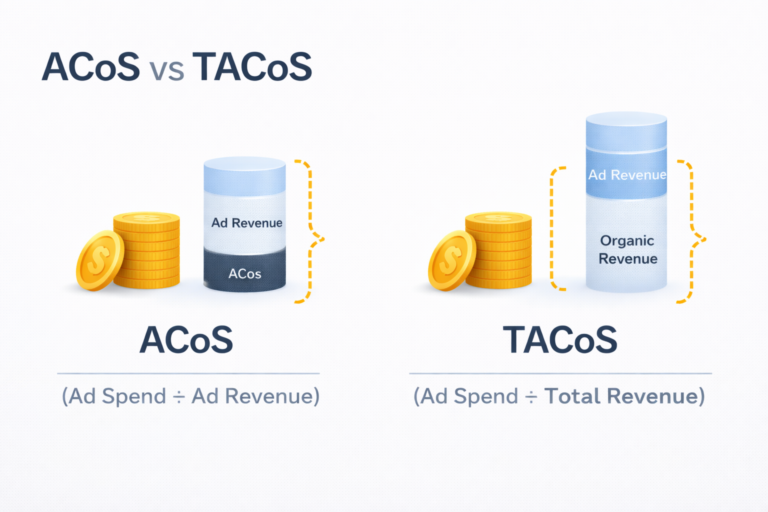
TACoS (Total Advertising Cost of Sale) measures ad spend as a percentage of total revenue—including organic sales. It’s a better health metric than ACoS because it shows whether advertising is building organic momentum.
Calculate TACoS: (Total Ad Spend ÷ Total Revenue) × 100
A product with 80% ACoS but 25% TACoS is healthy. The ads are expensive, but they’re driving enough organic sales to justify the investment. A product with 40% ACoS but 40% TACoS is in trouble—nearly all sales still depend on advertising.
During launch, TACoS might start at 50-70% and should decline steadily. If TACoS isn’t improving by day 60, something is wrong:
Your listing doesn’t convert well enough to rank organically
You’re targeting keywords where you’re not truly relevant
Competition is too strong for your current price/review combination
Scale What’s Working
By day 75, you have enough data to make aggressive decisions. Keywords that haven’t generated a sale after $50-75 in spend need to be paused or significantly restructured. Don’t keep hoping they’ll work.
Double down on keywords showing organic ranking improvement. If you’ve moved from position 85 to position 45 for a term, increase your Exact Match bid by 20-30%. Push for page one while momentum is building.
What Are the Biggest Launch Mistakes Sellers Make?
- Advertising a Listing That Isn’t Ready
Your main image is your ad. If it doesn’t stop the scroll on mobile, no amount of targeting sophistication will save you. Advertising can’t fix a listing problem—it only exposes it faster and more expensively.
Before spending on ads, confirm:
Your images are professional and mobile-optimized
Your title balances keywords with readability
Your bullets focus on benefits, not just features
Your price is competitive within your segment
You have at least 7 high-quality images
Every click you pay for that doesn’t convert is wasted money and a negative signal to Amazon’s algorithm.
- Underbidding at Launch
Amazon pays attention to new products early. There’s a brief window where the algorithm is actively gathering data about your product. Conservative bids waste this window.
Sellers see early losses and cut bids, which reduces impressions and extends the learning period indefinitely. You end up spending the same money over three months that you should have spent in one, with worse results.
Bid high early. Collect data fast. Then optimize based on what you learned.
- Treating Auto Campaigns as a Strategy
Auto campaigns should feed your Exact Match campaigns, not replace them. Auto is a research tool that identifies opportunities. If you’re still running most of your spend through Auto at day 60, you haven’t built a real advertising structure.
The progression should be: Auto/Broad discover → Exact Match captures → Brand campaigns defend and expand.
- Ignoring Your Search Term Report
The Search Term Report shows exactly which queries triggered your ads and whether they converted. It’s your most valuable data source during launch.
Reviewing it weekly is non-negotiable. Monthly reviews mean you’ve wasted weeks of budget before catching problems. Sellers who check weekly move fast—identifying winners, killing losers, and compounding what works.
- Cutting Ads When It Matters Most
Week five is expensive. Week six feels hopeless. ACoS is high. You’re losing money daily. So you pause campaigns or slash budgets by 70%.
This kills all momentum. Amazon was just starting to understand your product and improve your organic ranking. Now you’ve stopped the sales signals. Your ranking stagnates or drops. You essentially restart from zero when you resume.
If budget is truly unsustainable, reduce it gradually (20-30%), don’t eliminate it. Focus remaining spend on your top 5 proven keywords rather than trying to do everything.
- Not Understanding Category Dynamics
A blog post says “you can rank in 30 days with $1,000 in ad spend.” You try it and fail. Why? Because the author sold yoga mats (moderate competition) and you’re selling wireless earbuds (extreme competition).
Different categories have radically different requirements:
Review velocity expectations
Average CPC
Conversion rate benchmarks
Time to ranking
Research your specific category before launching. Look at:
Top 20 products’ review counts
How many sponsored results appear in search
Average CPC (run test campaigns to check)
Adjust your timeline and budget expectations accordingly.
Why Would a Structured Launch Still Fail?
A structured launch gives you the best odds, but not a guarantee. Some realities can’t be overcome by execution alone.
Market saturation: Some categories are so competitive that even well-run campaigns can’t overcome entrenched incumbents. If the top 20 products all have 5,000+ reviews and you launch with zero, you’re fighting uphill regardless of strategy.
Fundamental product issues: Weak differentiation, pricing problems, or insufficient demand can’t be fixed by advertising. If your product doesn’t solve a problem better than alternatives, no amount of ad spend will change that.
Timing and luck: Sometimes launches don’t click for reasons that aren’t obvious even after reviewing all the data. Market timing, seasonal factors, or shifts in customer preferences can impact results in ways you can’t predict.
The 90-day timeline isn’t arbitrary. That’s roughly how long it takes to build enough keyword relevance and sales history to rank organically. If your product isn’t gaining traction by day 90, reassess the fundamentals:
Product-market fit
Listing quality and conversion rate
Price positioning relative to competition
Category competition level
More ad spend rarely solves a problem that’s still showing up at day 90. What a structured launch guarantees is data. You’ll know which keywords convert, which don’t, and whether the unit economics can work. That’s valuable even when the answer is “this product needs changes before it can succeed.”
How Ecomclips Helps You Turn Sponsored Traffic Into Real Sales
At Ecomclips, we know one hard truth about Amazon advertising: clicks don’t build businesses, conversions do. That’s why our strategy focuses on turning sponsored traffic into measurable, profitable sales, not wasted ad spend.
Strategic Campaign Planning: We build data-driven Amazon ad campaigns targeting the right keywords, ASINs, and buyer-intent audiences, ensuring your ads reach shoppers who are ready to buy—not just browse.
Conversion-Focused Ad Creative: Our team optimizes ad copy, headlines, and visuals to stop the scroll, build trust fast, and guide shoppers toward confident purchase decisions.
Optimized Product & Landing Pages: We align your ads with high-converting listings, A+ Content, images, and messaging, so every click lands on a page designed to convert, not confuse.
Continuous Performance Monitoring: We track ACoS, TACoS, CTR, CVR, and sales velocity in real time, refining bids, keywords, and placements to maximize ROI throughout the first 90 days.
Full-Service Amazon Growth Support: From launch strategy and PPC management to post-click optimisation and scaling, Ecomclips manages the entire process, helping your product rank faster and sell consistently.
At Ecomclips, we don’t just run ads—we build ranking systems that turn sponsored visibility into long-term organic growth, so your Amazon product launch doesn’t stall after the first clicks.
Contact us today at info@ecomclips.com or book an appointment with our Amazon experts to start driving Sponsored Brands traffic that converts.
Frequently Asked Questions
Q. How much should I budget for an Amazon product launch?
Plan to spend 20–40% more than your long-term monthly ad budget for the first 90 days. Expect losses early—this concentrated spend fuels data, visibility, and faster ranking.
Q. When should I start Exact Match campaigns for a new product?
Launch Exact Match only after 5–10 search terms generate real sales, usually in weeks 2–3. Conversions are proof—move winners from Auto or Broad, don’t guess early.
Q. What does it mean if I have good CTR but bad conversion rate?
High CTR with low conversion means your listing is the problem, not your ads. Fix pricing, images, bullets, reviews, and mobile layout before changing targeting.
Q. How often should I review my Search Term Report during a launch?
Review it weekly for the first 45 days to mine winners and block waste fast. Monthly reviews are too slow and burn unnecessary ad spend.
Q. Should I run a coupon during my Amazon product launch?
Yes—5–10% coupons boost CTR and conversion by standing out in search. Treat coupon costs as part of your launch ACoS, not a separate expense.
Q. What’s the difference between ACoS and TACoS?
ACoS measures ad spend vs ad sales only, while TACoS includes organic sales too. TACoS shows whether ads are building organic momentum or just buying sales.
Q. How long does it take for a new Amazon product to rank organically?
Most products need 60–90 days of consistent sales and keyword relevance to stabilize. Stopping ads too early kills momentum before Amazon trusts your listing.
Watch how we help new sellers launch successfully:
Ecomclips: Your Complete eCommerce Solution Under One Umbrella
At Ecomclips, we bring every eCommerce service you need under one roof — strategy, operations, design, marketing, and growth, all seamlessly connected to help your brand thrive across every marketplace.
Since 2012, we’ve been helping businesses of all sizes launch, scale, and dominate online. From Amazon, Walmart, eBay, and Etsy to Shopify and WooCommerce, our team of marketplace experts, designers, developers, and marketers works together to deliver measurable results.
Our services span the full eCommerce lifecycle:
Account Setup & Product Listing Management: We handle registrations, compliance, and product data optimization across all marketplaces.
Amazon Optimization Service: From keyword-rich titles and A+ content to PPC campaigns and storefront design, we craft listings that convert.
Creative Design & Content Production: A+ visuals, infographics, brand stores, and product videos built to boost engagement.
Advertising & PPC Management: Smart, data-driven ad strategies for Amazon, Walmart, and Google that maximize ROI.
Web Development & Store Design: Shopify, WooCommerce, and Magento websites built for performance and conversion.
Data Management & Automation: Streamlined product feeds, catalog syncing, and inventory control for effortless scalability.
Customer Service & Order Fulfillment: End-to-end support that enhances customer satisfaction and builds long-term loyalty.
Analytics & Growth Strategy: Real-time insights and ongoing optimization to ensure consistent, profitable growth.
Whether you’re launching a new store or managing multiple global marketplaces, Ecomclips acts as your single strategic partner, simplifying complexity and driving sustainable revenue growth.
📝 Website Description
Keywords & Relevance: Amazon needs to know what your product is and which search terms it should show up for. This comes from your title, bullet points, description, and backend search terms. Without proper keyword optimization, Amazon simply won’t know when to show your product.
Sales Velocity: This is the rate at which your product generates sales. Products that consistently make sales (especially in a short time period) signal to Amazon that customers want this product, which triggers higher rankings.
Conversion Rate (CVR): If 100 people see your listing and 15 buy it, you have a 15% conversion rate. Amazon loves high-converting products because they make the shopping experience better and generate more revenue. Low conversion rates tell Amazon that customers aren’t interested.
Launching a new product on Amazon in 2026? Ranking fast is harder than ever with rising competition and AI-driven algorithms like Rufus and A10.
This complete guide reveals the best Amazon product launch advertising strategy for 2026, including PPC setup, keyword targeting, budget planning, external traffic, and conversion optimization to help your listing rank on page one within the first 90 days and achieve long-term organic sales.
🏷️ Website Tags (Comma Separated)
Amazon product launch, Amazon PPC strategy 2026, rank on Amazon fast, Amazon listing ranking, Amazon A10 algorithm, Rufus Amazon, Amazon advertising strategy, Amazon FBA launch, new product launch Amazon, Amazon keyword research, Amazon external traffic, Amazon SEO, Amazon seller growth, Amazon ads optimization


Chat On WhatsApp
📲 Chat On WhatsApp
Please Contact with us for more details.
✅ Our Services Contact Info:
📞 Phone: +8801566058831
💬 WhatsApp: wa.me/8801933307999
🎧 Skype: azadarch
🌐 Website: www.azadservice.com
📢 Telegram: https://t.me/Azadservice
📩 Email: azadarc@gmail.com
🌍 Follow & Connect With Us:
▶️ YouTube Channel:
https://www.youtube.com/@DropshippingService?sub_confirmation=1
👨💻 Virtual Assistant Services:
www.azadservice.com/category/virtual-assistant/
👥 Facebook Group:
https://www.facebook.com/groups/854505676275341/
📘 Facebook Page:
https://www.facebook.com/independentservice.today
💼 LinkedIn:
https://www.linkedin.com/in/azadservice/
📸 Instagram:
https://www.instagram.com/azadservicebd/
📌 Pinterest:
https://www.pinterest.com/aza
✅ Optimized YouTube Description (All Videos)
Below is your final polished version:
🔥 Watch Our Best E-Commerce Tutorials & Professional Service Guides
Grow your Amazon, Walmart, Shopify, TikTok, and eBay business with expert strategies, step-by-step tutorials, and high-ROI services.
✅ Most Popular Videos
🔹 Remove Infringing Sellers — Protect Your Trademark
https://www.youtube.com/watch?v=GRSBPMQryhc&list=PLhwkTM6gFzyqU97M5cDqqbEuuiKg3eMC2
🔹 Amazon FBA Private Label Product Research — Find Winning Products 🚀
https://www.youtube.com/watch?v=GRSBPMQryhc&list=PLhwkTM6gFzyqU97M5cDqqbEuuiKg3eMC2
🔹 Walmart Store Setup & Management — Grow Your Walmart Business
https://www.youtube.com/watch?v=GRSBPMQryhc&list=PLhwkTM6gFzyqU97M5cDqqbEuuiKg3eMC2
🔹 How to Generate UPC Codes (Non-GS1) for Amazon, eBay, Shopify
https://www.youtube.com/watch?v=GRSBPMQryhc&list=PLhwkTM6gFzyqU97M5cDqqbEuuiKg3eMC2
🔹 Brand Name Approval on Amazon WITHOUT Brand Registry
https://www.youtube.com/watch?v=GRSBPMQryhc&list=PLhwkTM6gFzyqU97M5cDqqbEuuiKg3eMC2
🔹 $10K Investment Strategies Revealed by Financial Analyst
https://www.youtube.com/watch?v=GRSBPMQryhc&list=PLhwkTM6gFzyqU97M5cDqqbEuuiKg3eMC2
🔹 Amazon Transparency Program Setup — Protect Your Account
https://www.youtube.com/watch?v=GRSBPMQryhc&list=PLhwkTM6gFzyqU97M5cDqqbEuuiKg3eMC2
🔹 Manage Amazon PPC Campaigns Like a Pro 🚀
https://www.youtube.com/watch?v=GRSBPMQryhc&list=PLhwkTM6gFzyqU97M5cDqqbEuuiKg3eMC2
🔹 Expert VA for Amazon, eBay, Walmart, TikTok & Shopify
https://www.youtube.com/watch?v=GRSBPMQryhc&list=PLhwkTM6gFzyqU97M5cDqqbEuuiKg3eMC2
🔹 TikTok Shop Owners — STOP This Big Mistake
https://www.youtube.com/watch?v=GRSBPMQryhc&list=PLhwkTM6gFzyqU97M5cDqqbEuuiKg3eMC2
🔹 Complete eBay Selling Guide for Beginners (2025)
https://www.youtube.com/watch?v=GRSBPMQryhc&list=PLhwkTM6gFzyqU97M5cDqqbEuuiKg3eMC2
🔹 Sell Products Online on Amazon Saudi Arabia
https://www.youtube.com/watch?v=GRSBPMQryhc&list=PLhwkTM6gFzyqU97M5cDqqbEuuiKg3eMC2
🔹 Start a Shopify Dropshipping Store (Bangladesh Guide)
https://www.youtube.com/watch?v=GRSBPMQryhc&list=PLhwkTM6gFzyqU97M5cDqqbEuuiKg3eMC2
🔹 How to Collect Creative T-Shirt Design Concepts 🎨
https://www.youtube.com/watch?v=GRSBPMQryhc&list=PLhwkTM6gFzyqU97M5cDqqbEuuiKg3eMC2
🔹 Fix Amazon Seller Account Health 🚨 (Suspension Appeal)
https://www.youtube.com/watch?v=GRSBPMQryhc&list=PLhwkTM6gFzyqU97M5cDqqbEuuiKg3eMC2
🕌 Motivational Note
Before starting your work, always pray.
If you have prayed, Alhamdulillah. If not, please pray first — it brings barakah to your day.
📲 Chat With Us on WhatsApp (24/7 Support)
👉 wa.me/8801933307999
📞 Contact Information
✔ Phone: +8801566058831
✔ WhatsApp: wa.me/8801933307999
✔ Skype: azadarch
✔ Website: www.azadservice.com
✔ Telegram: https://t.me/Azadservice
✔ Email: azadarc@gmail.com
🌍 Follow & Connect With Us
▶ YouTube Channel:
https://www.youtube.com/@DropshippingService?sub_confirmation=1
👨💻 Virtual Assistant Services:
www.azadservice.com/category/virtual-assistant/
👥 Facebook Group:
https://www.facebook.com/groups/854505676275341/
📘 Facebook Page:
https://www.facebook.com/independentservice.today
💼 LinkedIn:
https://www.linkedin.com/in/azadservice/
📸 Instagram:
https://www.instagram.com/azadservicebd/
📌 Pinterest:
https://www.pinterest.com/aza








+ There are no comments
Add yours