







💰 More Profit Description: How Sellers Can Profit from Walmart’s Return System
Returns may feel like a setback—but for experienced Walmart sellers, they’re actually a strategic opportunity to protect profit, reduce risk, and boost customer trust. Here’s how you can turn refund policies into growth:
✅ 1. Dispute Management = Recover Lost Revenue
Walmart allows sellers to dispute wrongful returns or non-returned items. By actively tracking and challenging invalid claims:
- You avoid paying for items you never received back
- You can recover hundreds—even thousands—monthly
💡 It’s hidden profit protection that many sellers overlook.
✅ 2. Optimized Listings = Fewer Returns
Returns often happen due to unclear product details. Fix that and watch your profits grow:
- Accurate titles, images & descriptions reduce return rates
- Keyword-rich listings boost conversion and lower dissatisfaction
💡 Fewer returns = more happy buyers = more money in your pocket.
✅ 3. Faster Processing = Higher Seller Ratings
Walmart rewards sellers who process returns and refunds efficiently. By staying compliant and proactive, you:
- Improve your seller score
- Qualify for Walmart Buy Box and higher visibility
💡 Better visibility = more sales and higher margins.
✅ 4. Using Returns Data = Smarter Inventory Decisions
Analyze your return reports:
- Spot which items are returned most
- Replace poor performers with high-rated alternatives
- Adjust pricing or product bundles to meet buyer expectations
💡 Smart inventory = fewer losses, more repeat buyers.
✅ 5. Customer Satisfaction = Long-Term Profit
Even when returns happen, how you handle them matters:
- Fast, fair returns build brand trust
- Happy customers are more likely to rebuy or leave 5-star reviews
💡 Returns are not just costs—they’re opportunities for retention.
✅ Pro Tip: Many Walmart sellers miss out on profit simply because they don’t manage disputes or analyze return trends. Don’t let your money leak away—treat returns like a business strategy.
🛍️ Walmart Refunds & Returns – Hassle-Free Support for Shoppers & Sellers
At Azad Service Ltd., we specialize in providing end-to-end support for Walmart refunds and returns, helping both buyers and sellers navigate the process with ease and efficiency.
Whether you’re a customer returning a product or a seller handling refund requests, our expert virtual assistant (VA) team ensures your experience is smooth, fast, and compliant with Walmart’s latest policies.
🔍 What We Offer
✔️ Clear Guidance on Refund Eligibility
✔️ Step-by-Step Return Instructions (In-store & Online)
✔️ Faster Refund Processing Support
✔️ Item Eligibility Verification
✔️ Dispute Resolution for Late or Missing Refunds
✔️ Seller Assistance for Return & Refund Management
We ensure you understand every part of the Walmart refund system, saving you time, money, and stress.
✅ Who Is This Service For?
- Walmart Shoppers needing help with return policies and refund tracking
- Walmart Marketplace Sellers dealing with customer returns and refunds
- Ecommerce Business Owners & Dropshippers managing Walmart orders
- Busy Entrepreneurs looking for reliable VA support to handle backend operations
🛠️ Technical Tools We Use
To make sure your refund or store management runs flawlessly, we use industry-leading tools like:
Jungle Scout, Helium 10, Keepa, DSers, AutoDS, and more.
We combine human support with automation tools to deliver fast, accurate results.
A quick view into the article:
- Walmart Return Policy
- Refund Adjustment Process on Walmart
- How to File a Return-Related Dispute
- How to Track Your Disputes
- Disputes for High-Value Items
- Special Tips & Tricks
- Final Thoughts
Walmart Return Policy
If you’re a seller on the Walmart Marketplace, it’s essential to know the ins and outs of the return process. Walmart’s Return Policy aims to enhance customer satisfaction and drive repeat purchases by offering a seamless return experience. Customers benefit from a generous 90-day window for exchanges or returns, unless exceptions apply.
In addition to the 90-day return window, Walmart’s Return Policy also emphasizes convenience for customers. It’s important to note that certain items may have specific return guidelines, such as electronics, which may be subject to a shorter return window or additional conditions. Walmart encourages sellers to communicate any specific return policies for their products, ensuring transparency and a positive shopping experience for customers.
Refund Adjustment Process on Walmart
Walmart’s Seller Center makes it easy for sellers to handle returns and refunds. If a customer wants to return something because it’s damaged or they got the wrong item, the seller must check the returned item at the warehouse. If it matches the original product and is in good condition, the seller has to give a refund.
Walmart has two types of refunds: full refunds, where the customer gets back the amount they paid, and partial refunds, where they get back part of the money based on certain criteria.
Now, let’s go through the steps of the refund process, explaining how sellers can smoothly manage this important part of selling on Walmart.
Full Refund Process
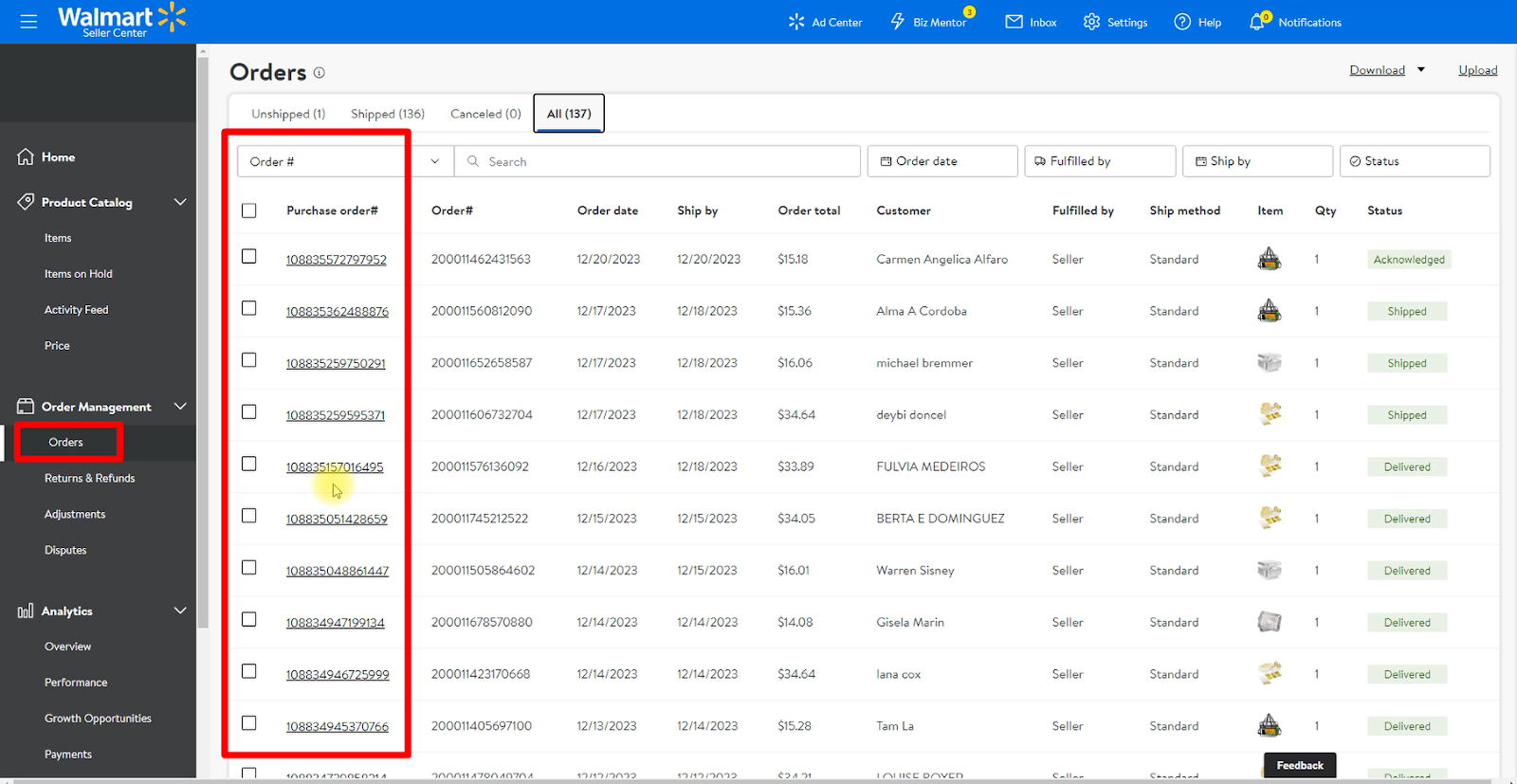
Step 1: Log in to your Walmart Account. Go to Orders and select the order you want to refund.
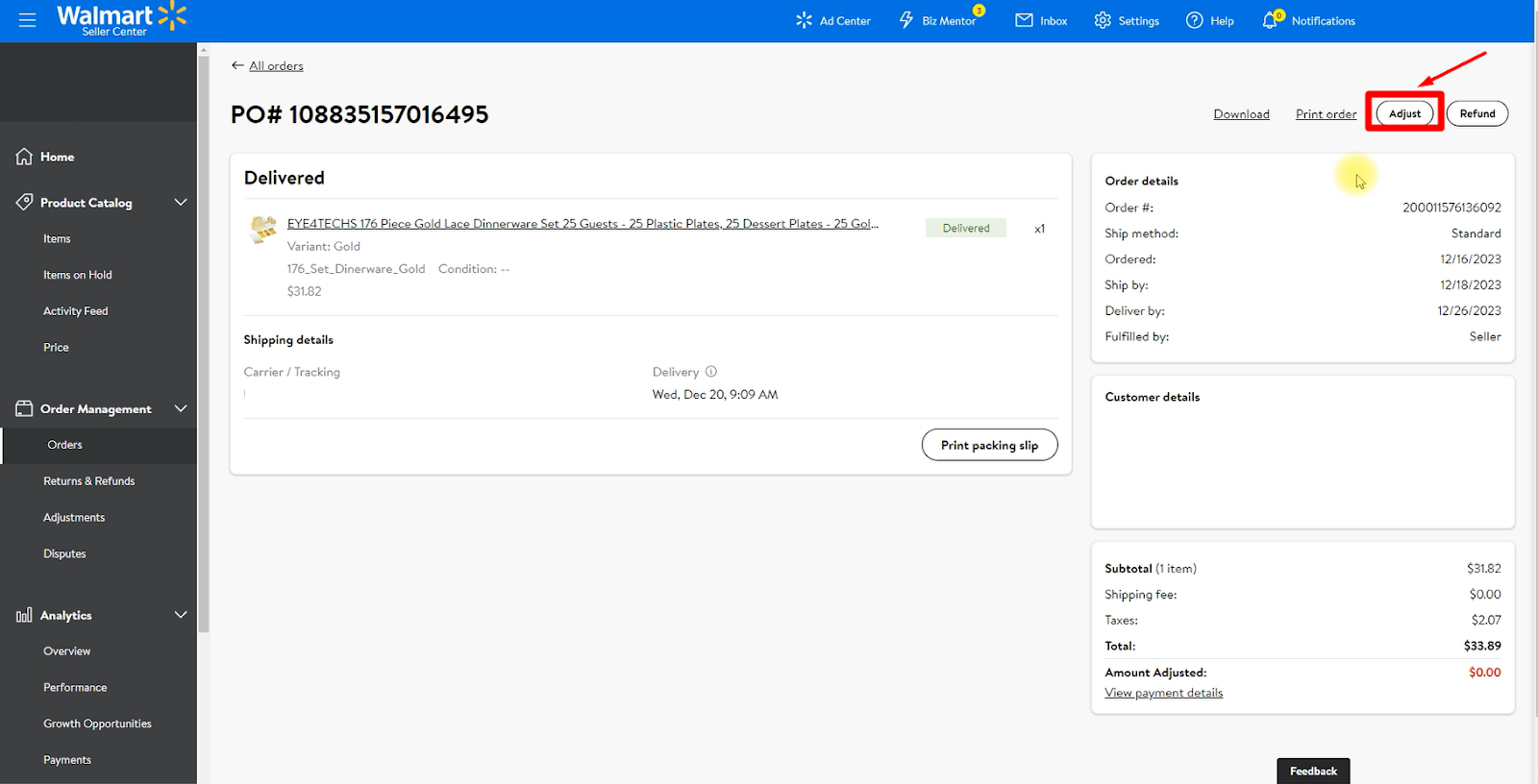
Step 2: Click on Adjust and it will redirect you to the refund page.
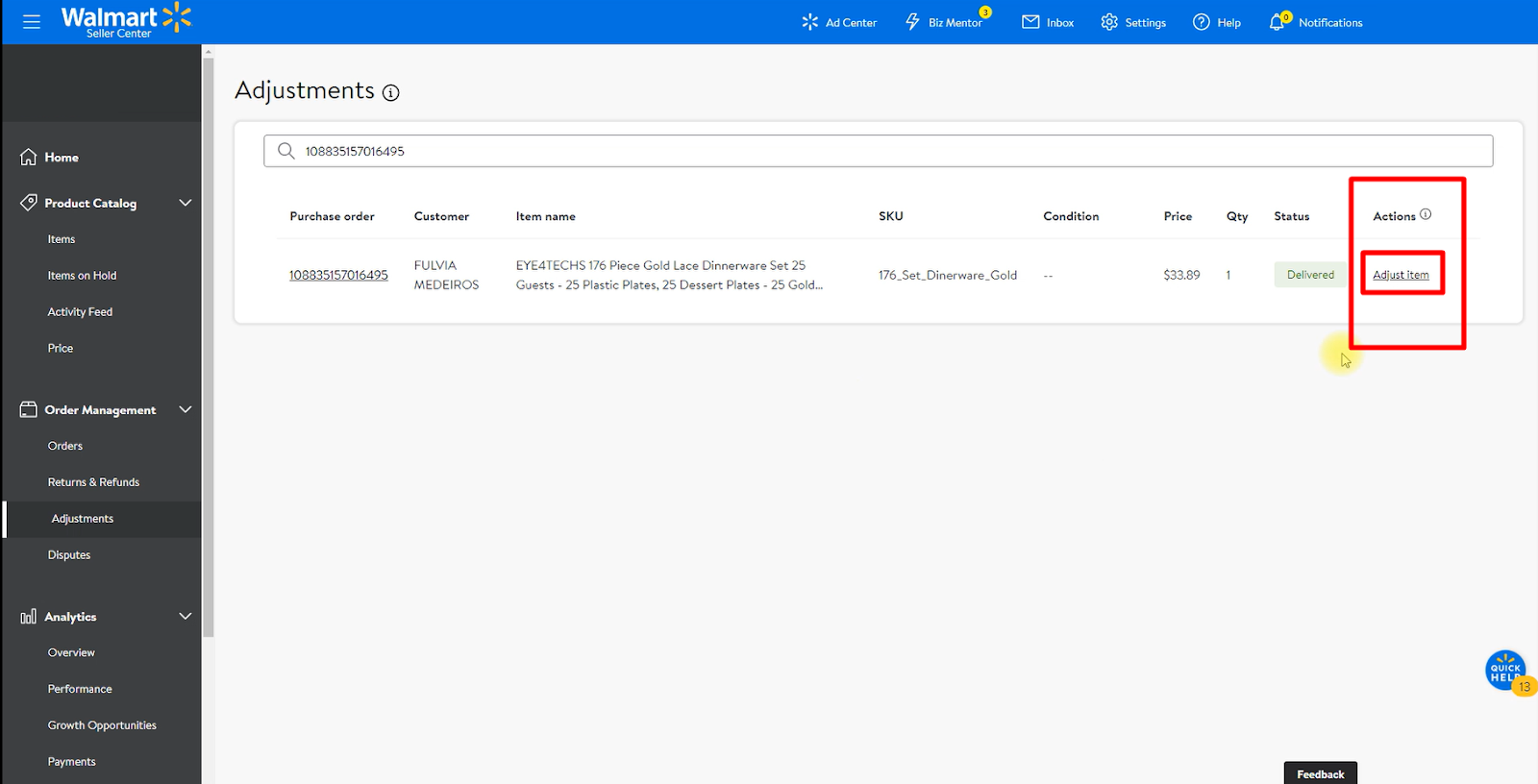
Step 3: Click Adjust item under the Actions.
Step 4: For a full refund – choose the Type of adjustment as Entire Amount. Then select the Refund category and Return Reason from the drop-down menu. You can also add a comment if you want. Finally, click on the Adjust button.
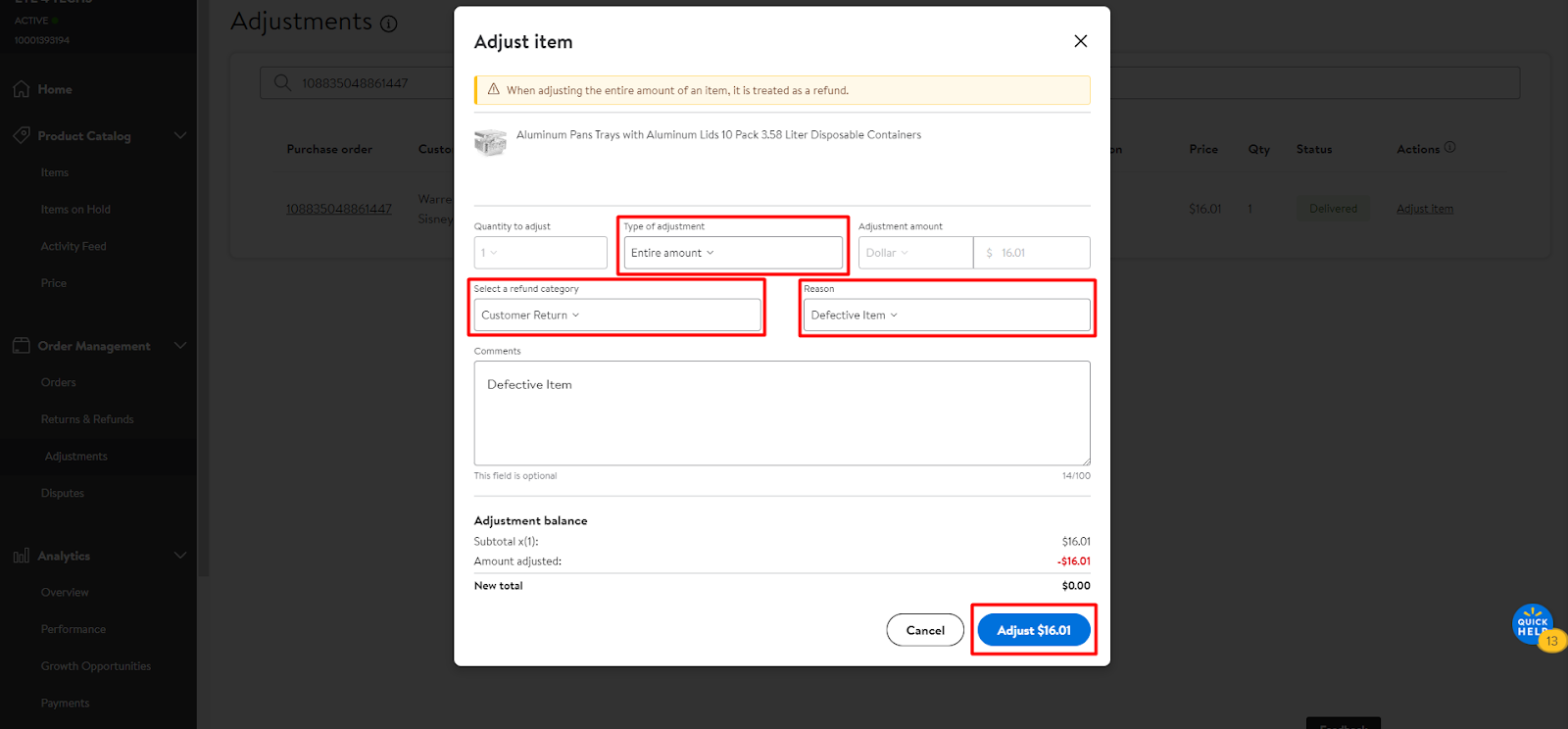
After that, this process will be completed, and the customer will receive a full refund.
Partial Refund Process
Sometimes, offering a partial refund can be a fair solution when you receive a slightly defective or used item. The process is almost the same as before.
For a partial refund, you have to choose Custom amount as the Type of adjustment. Then choose the Adjustment amount type from the drop-down menu. Here you can get two options: Dollar and Percentage. Select any of them and put the amount or percentage that you want to issue. Then select the Refund Reason. Finally, click on the Adjust button.
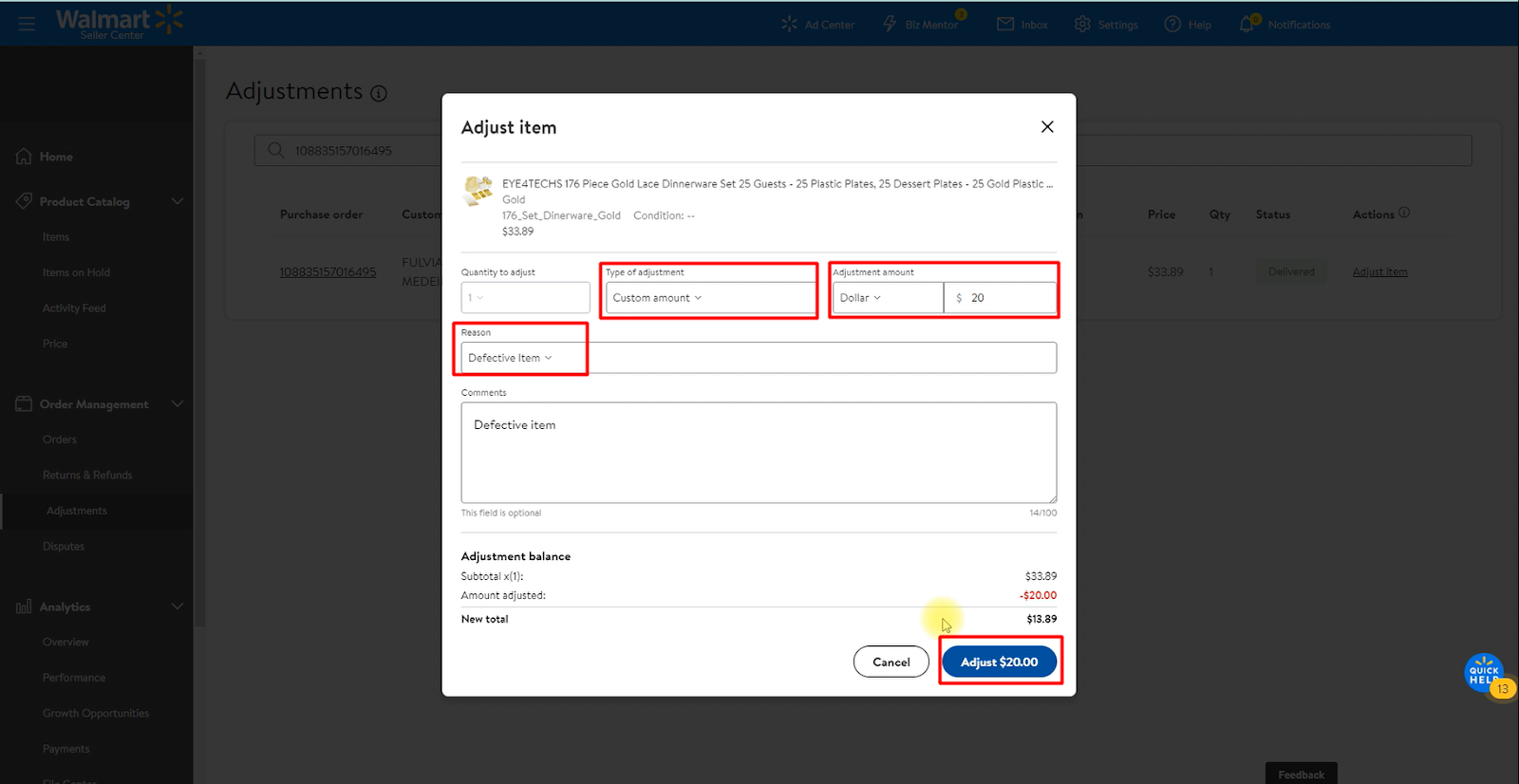
Following this, the procedure will be finalized, and the customer will get a partial refund.
How to File a Return-Related Dispute
If you find that a customer hasn’t returned the original product, or you have a valid reason for not wanting to issue a refund, such as receiving different items, missing parts, items in unsellable condition, or already sending a replacement, you can file a dispute with Walmart. Follow these steps:
Step 1: Go to Walmart Seller Center, and in the Order Management section, click on Returns & Refunds.
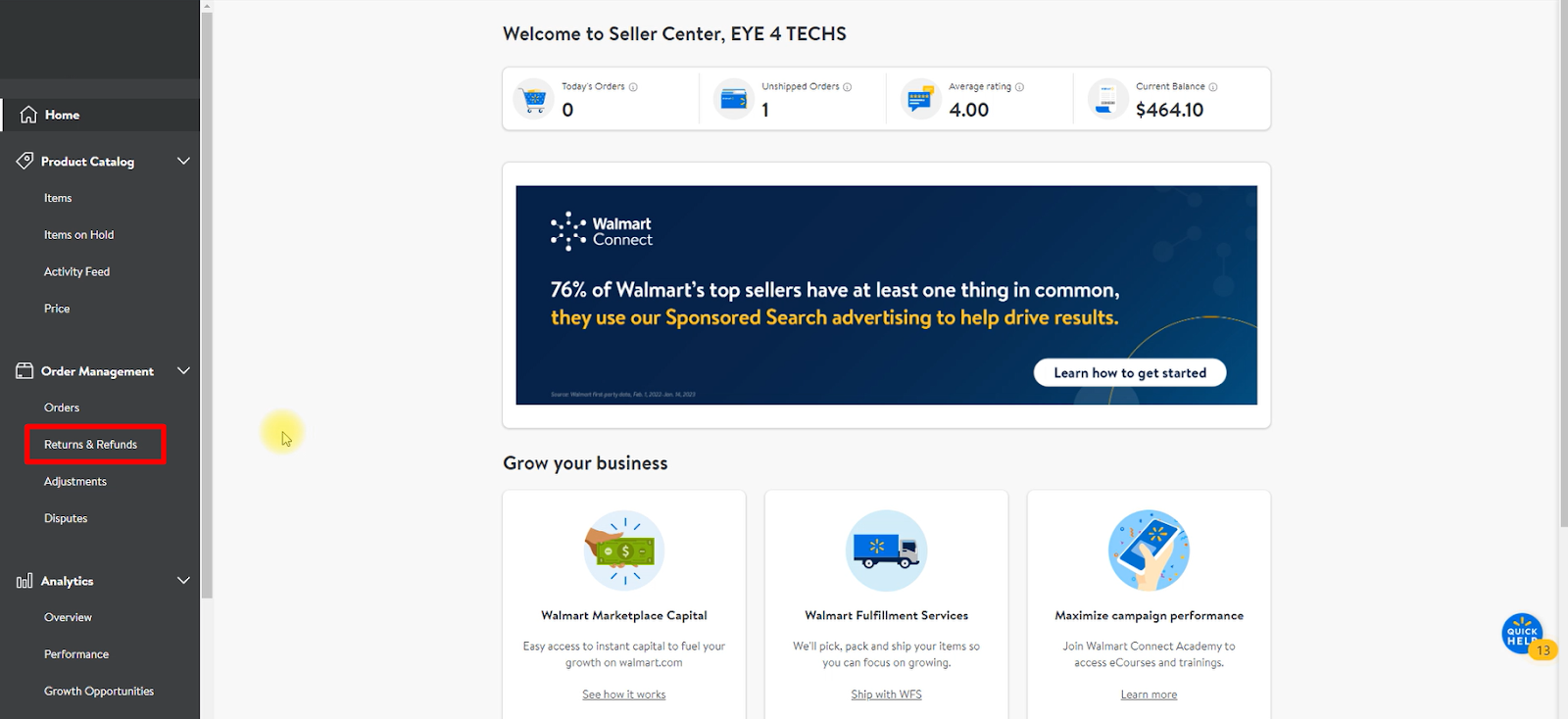
Step 2: In the Insight section, you will see the three categories: Initiated, Received, and Completed. Click on View Returns under Completed to proceed.
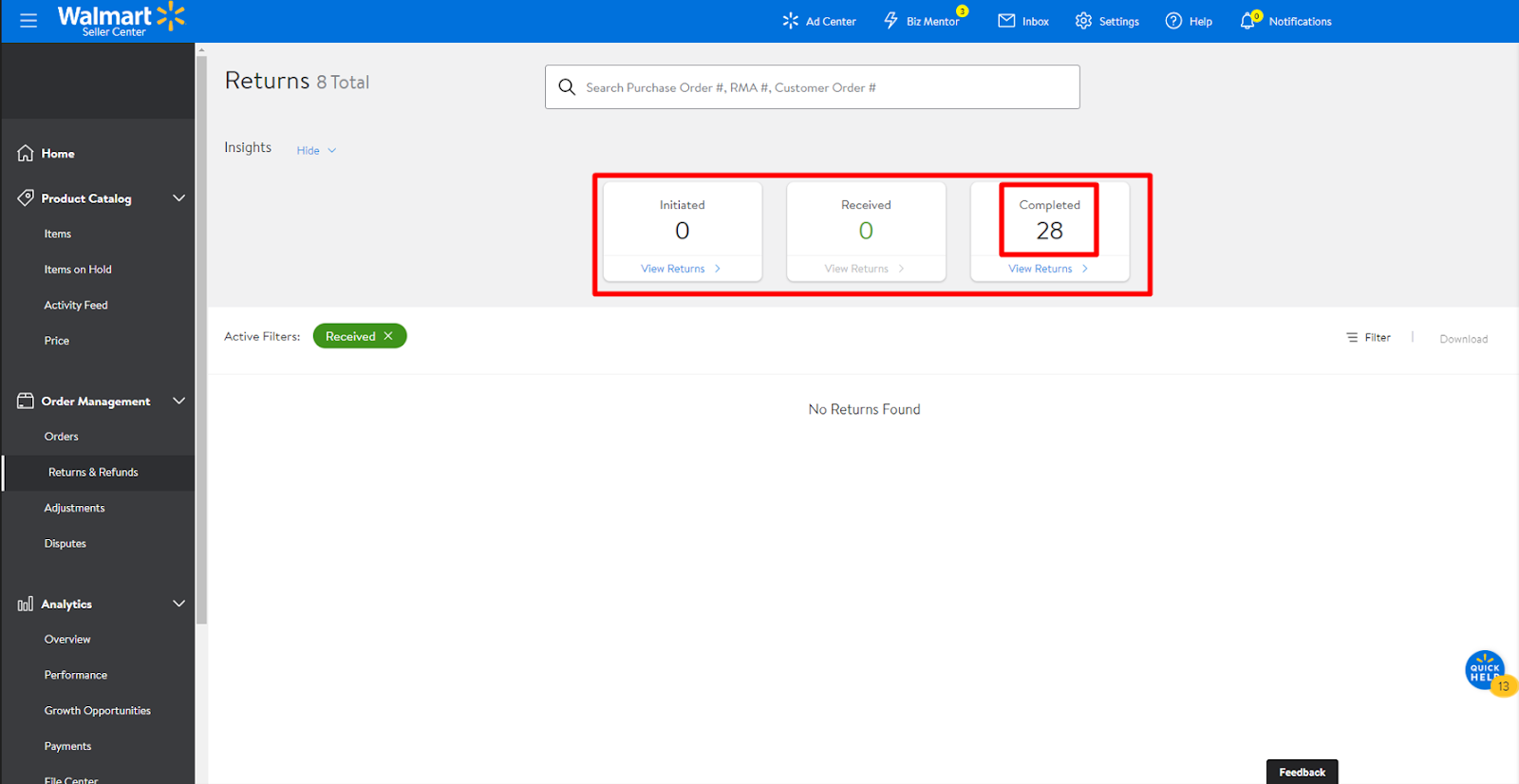
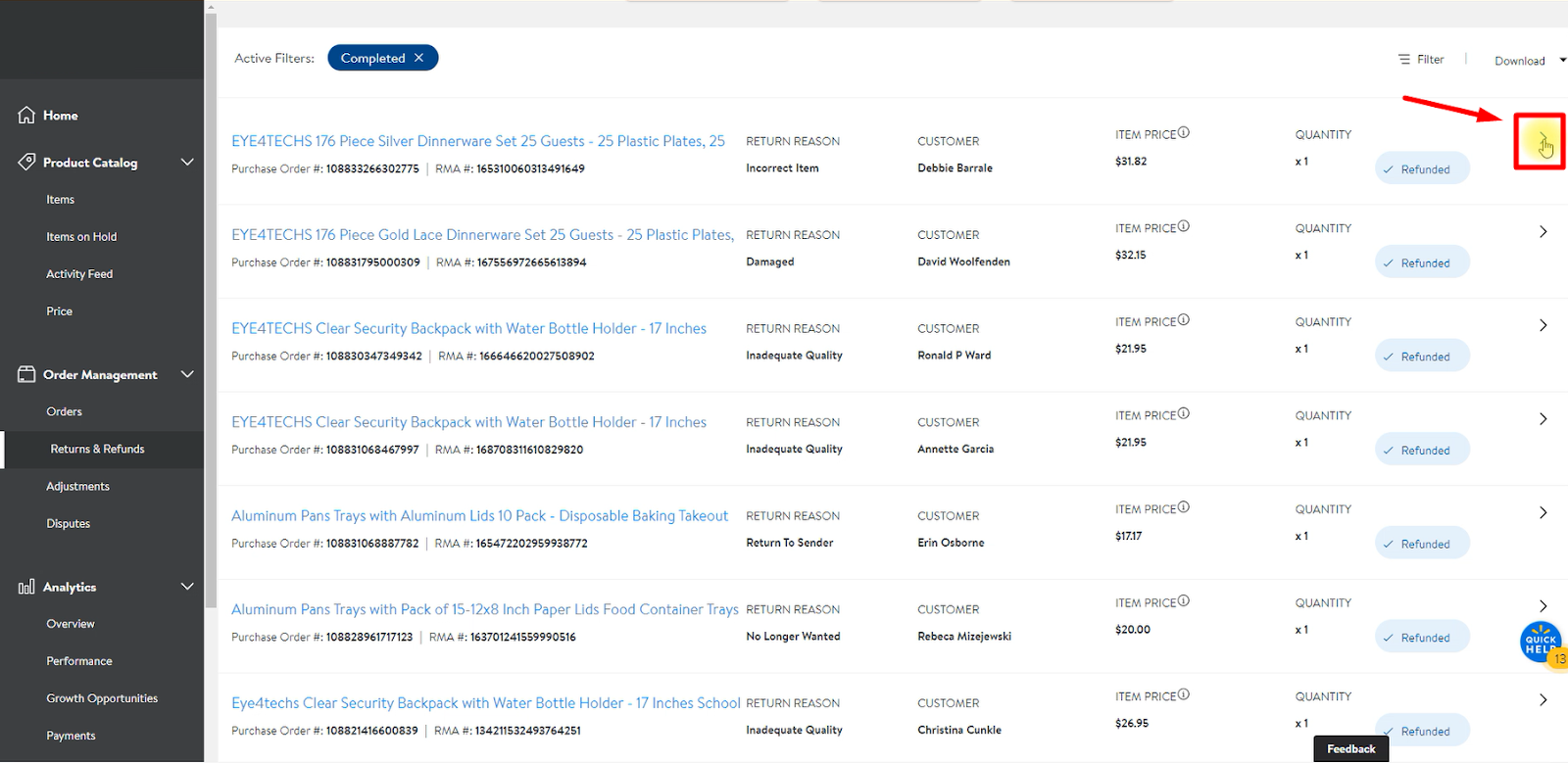
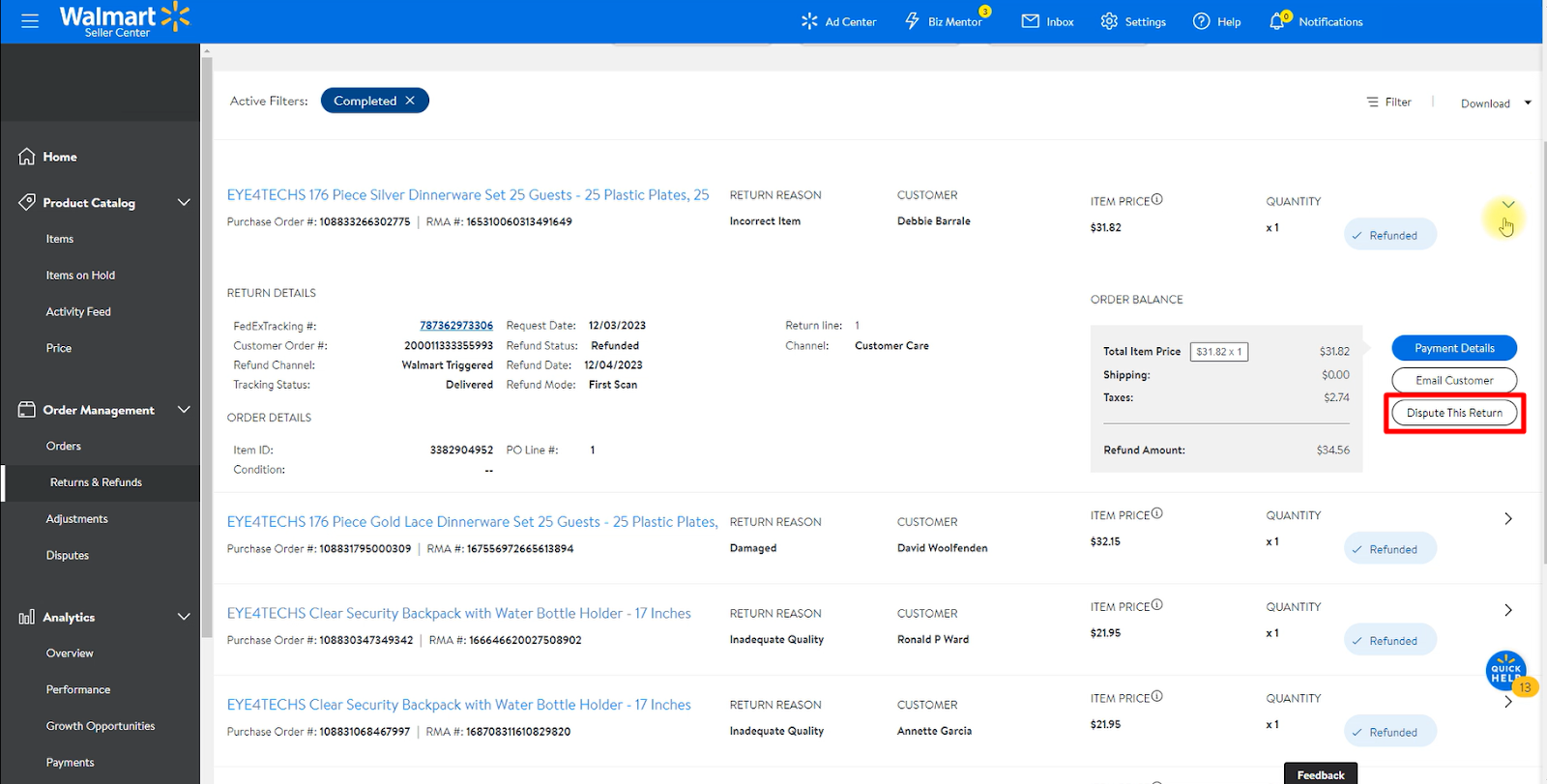
Step 3: In the list of completed returns, click on the little arrow button. You’ll see an option called Dispute this Return. Click on that.
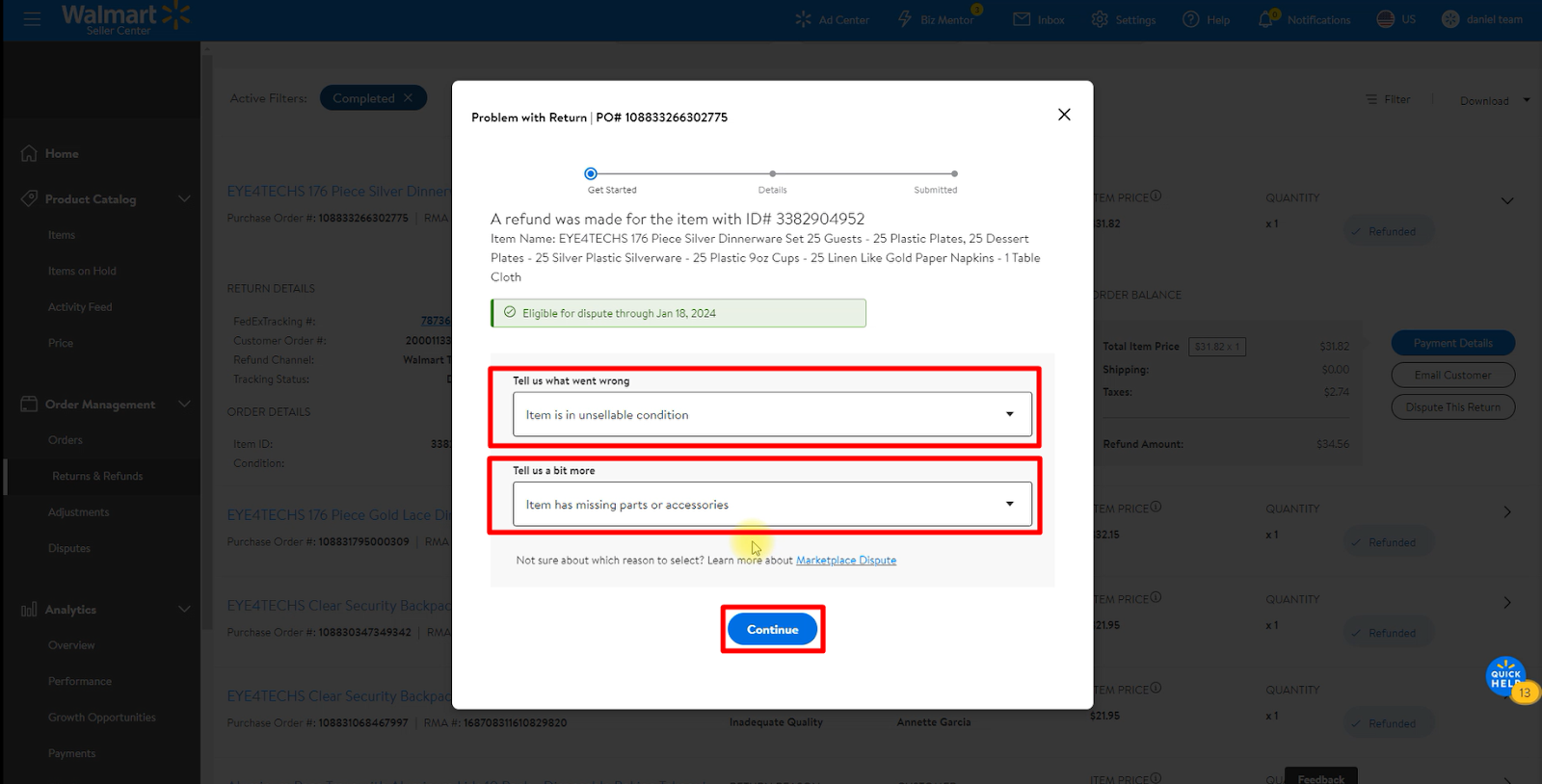
Step 4: Choose a reason and select a more specific option from the dropdown menu. Click on Continue.
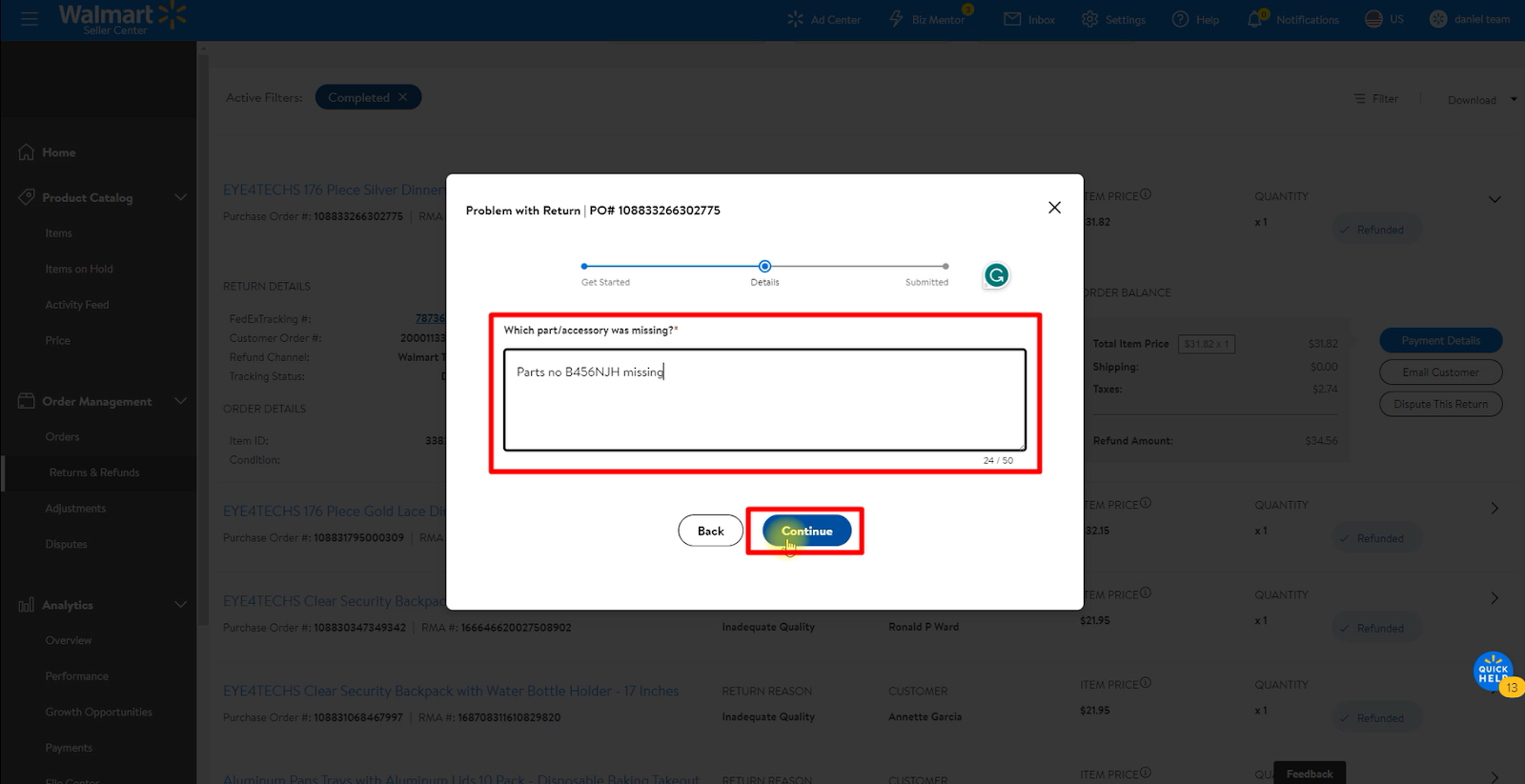
Step 5: Provide a detailed description of your issue. If parts are missing, specify their names. Click on Continue.
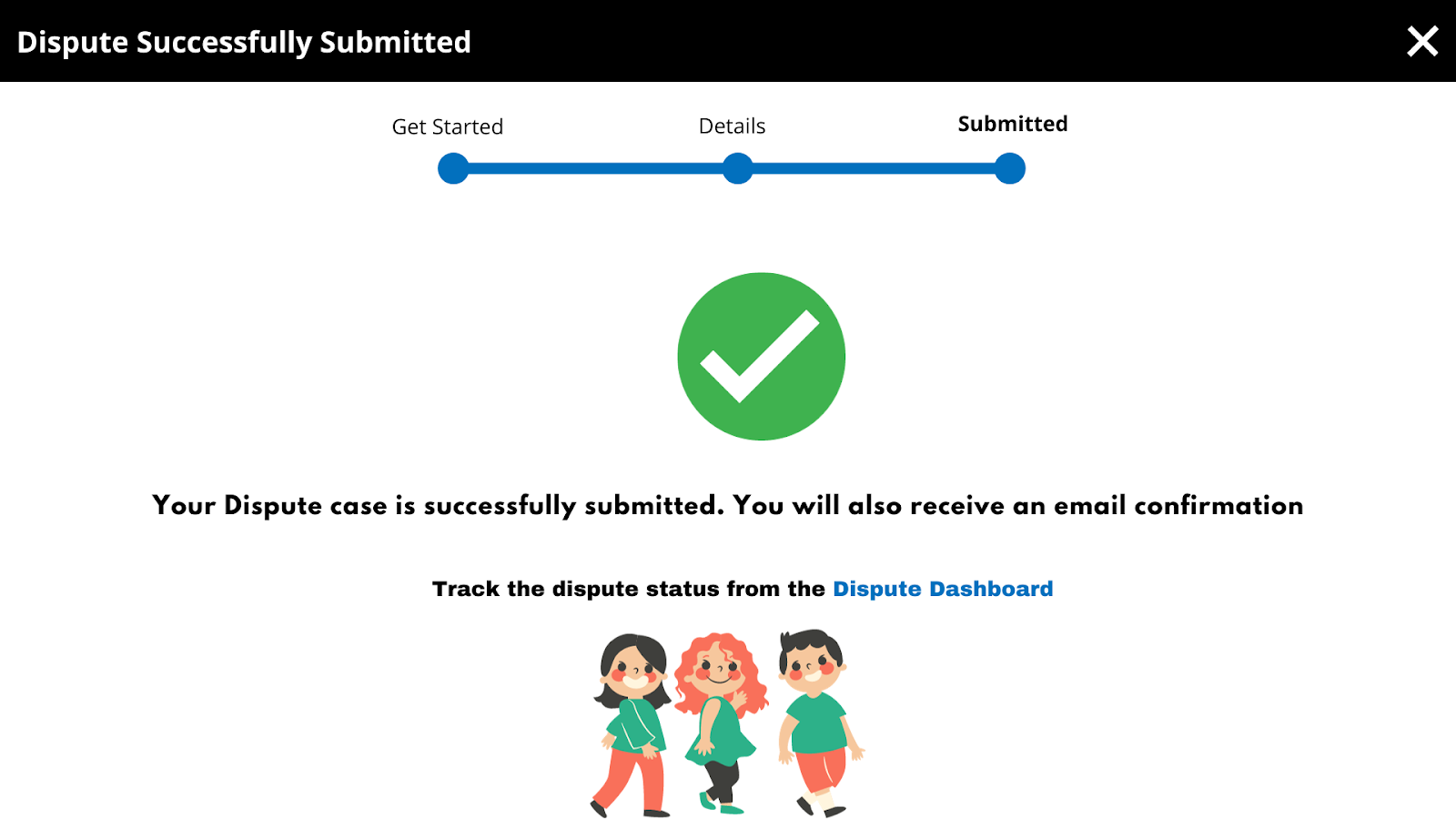
After successfully submitting your dispute, you’ll see a confirmation screen, and an email with the case number will be sent to you. This process ensures that you can effectively address and dispute return-related issues, maintaining a fair and transparent transaction environment on Walmart’s platform.
How to Track Your Disputes
You can track your disputes in the Seller Center under Order Management. From there, select Disputes and you’ll see all the disputes in your seller history. You can see these options:
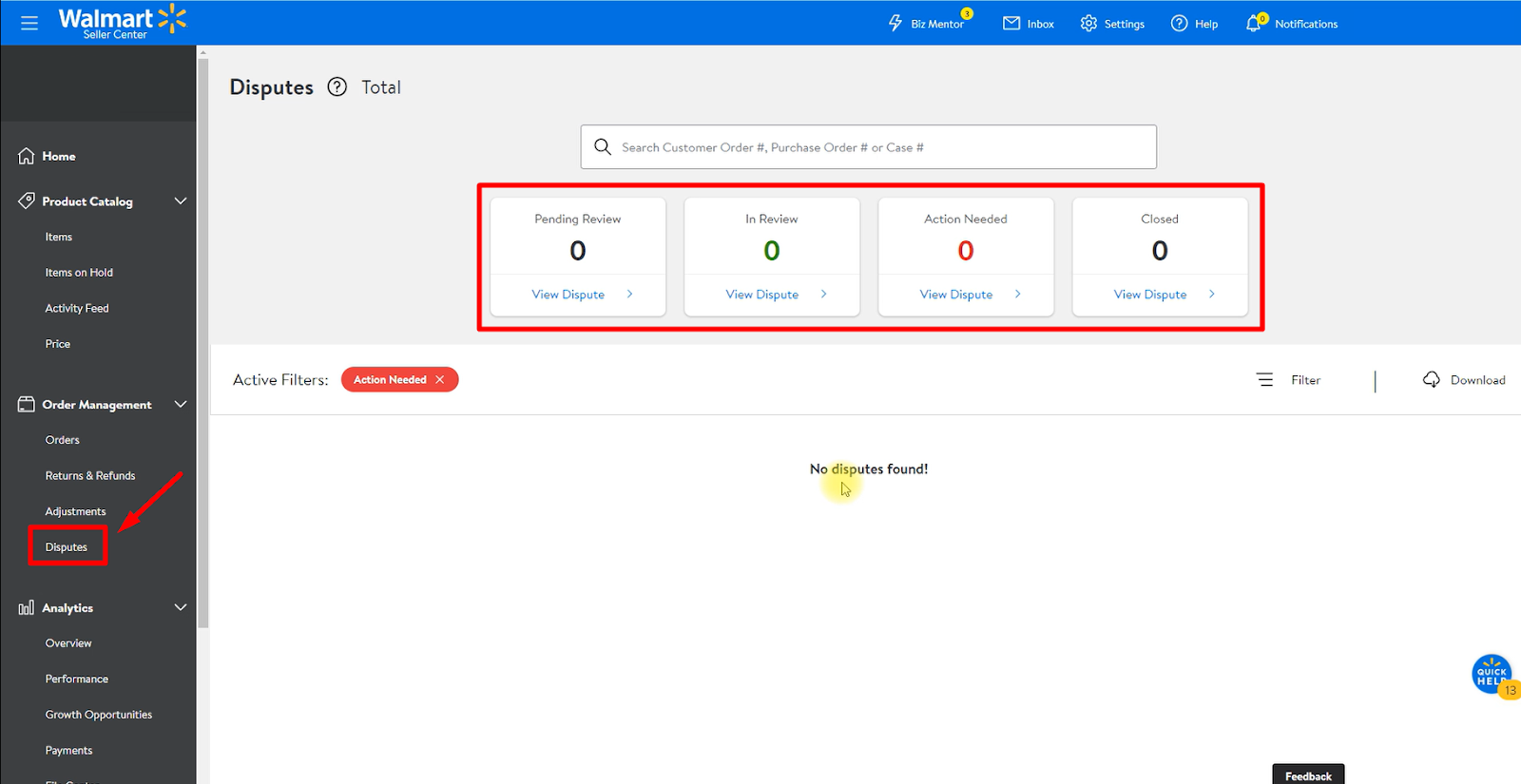
- Pending Review: Cases in this category are being looked at within the next 24 hours.
- In Review: These are cases that are currently being checked out.
- Action Needed: If a case needs more info from you, it falls into this category. You have 72 hours to provide the necessary details, or your case might be denied.
- Closed: Disputes in this group have already been looked into and, unfortunately, denied after careful consideration.
Disputes for High-Value Items

In case the return you want to dispute is a high-value item like over $100, then you can dispute the return earlier. From the Returns dashboard, you can file a Dispute about this return before refunding. Once you submit the dispute, the customer’s refund will be put on hold for 72 hours while Walmart reviews your case. If additional information is required, Walmart will contact you to submit it. If the dispute is approved within the timeframe, the customer won’t be refunded or their return will be canceled. If the dispute is approved after the refund hold is released, your reimbursement will be available in your account in 1-2 payment cycles.
Special Tips & Tricks
We all know that Walmart keeps track of all the returns for a product. If you get a lot of returns for a product, it will hurt your post-purchase score and your listing score. Ultimately, it will hurt your sales.
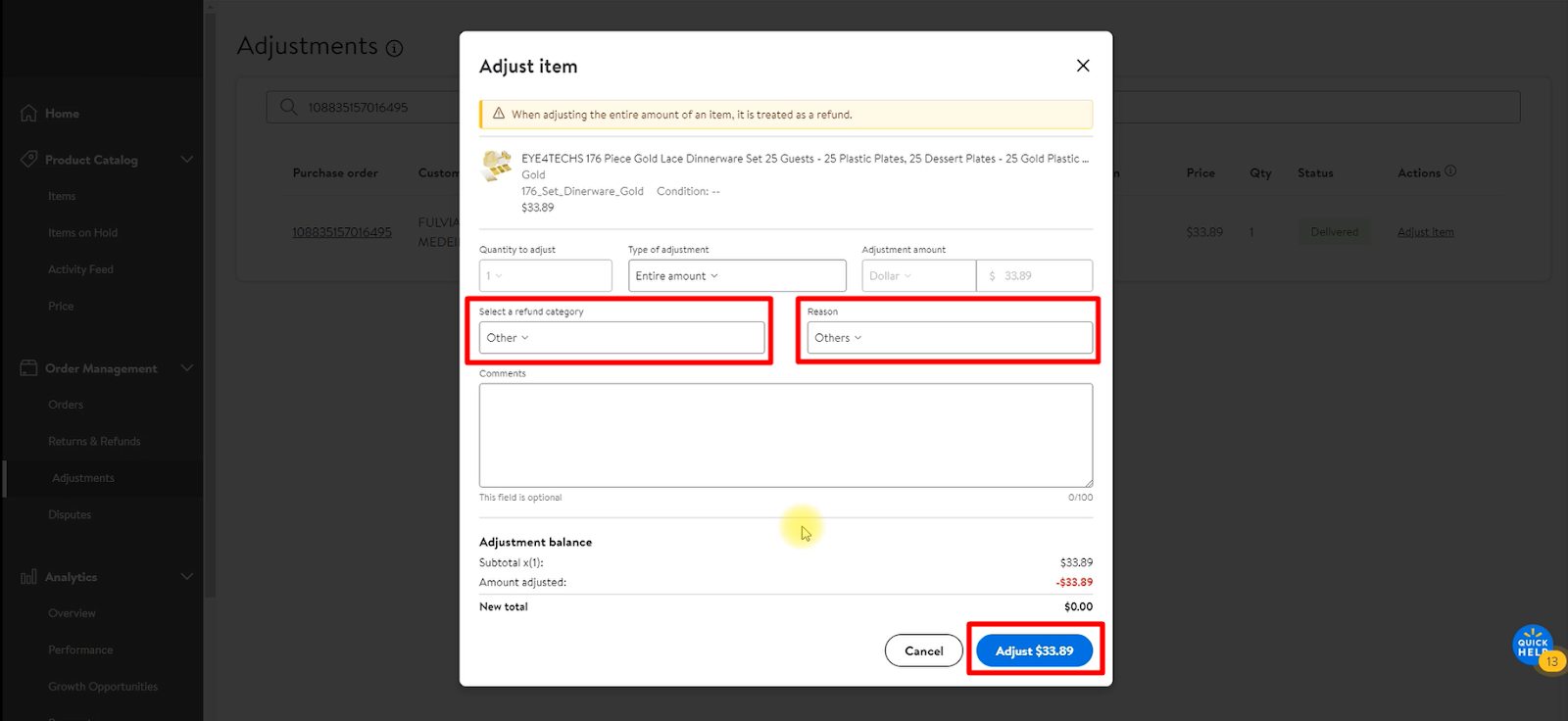
So, a trick we use to avoid this issue. When you’re refunding for a return, choose the refund category and reason as Others. This won’t affect your post-purchase or listing scores, and you’ll still be able to refund the customer.
Final Thoughts
Return is a very common part of any e-commerce business. By following these steps you save your Returns cost, precious time, and money. Therefore, it is important to understand exactly how work on Walmart, best practices for return policies, and strategies that can prevent excessive returns. Be intentional with how you design your policy and pay attention to the quirks of Walmart Marketplace.
If you have any queries, please let us know through the comment box or email us at info@ecomclips.com. We understand that every situation is different, so we offer a personalized approach to our service.
📞 Contact Us Today
Ready to simplify your Walmart return and refund experience?
📲 WhatsApp: Click to Chat
📧 Email: azadarc@gmail.com
📺 YouTube Channel: Dropshipping Service by Azad
Let us handle the complex refund systems so you can focus on growing your business.
🎓 Learn More – Free Walmart & Amazon VA Training (Bangla)
Explore our free training series on YouTube and master the skills of a professional VA or ecommerce store manager.
📌 Start Learning Now:
▶️ Amazon to Walmart VA – Part 1
🏷️ Keywords & Tags (for SEO)
pgsqlCopyEditWalmart Refund Service, Walmart Return Help, Walmart Return Policy 2025, Walmart Refund Bangladesh, Walmart Seller













+ There are no comments
Add yours